
TradingView Forex features: Unlocking Profitable Trades

In the dynamic world of Forex trading, having access to a robust and versatile platform is crucial for making informed decisions. TradingView Forex features offer a plethora of tools tailored to meet the needs of both novice and experienced traders. This article delves into the comprehensive capabilities of TradingView, highlighting how it can enhance your Forex trading experience.
Introduction to TradingView for Forex
TradingView is a web-based platform that provides advanced charting tools, technical analysis, and a vibrant social community for traders and investors. Launched in 2011, it has rapidly grown to become a go-to resource for market enthusiasts seeking real-time data and collaborative opportunities, making it an excellent choice for Forex trading platform comparison.
Key TradingView Forex features
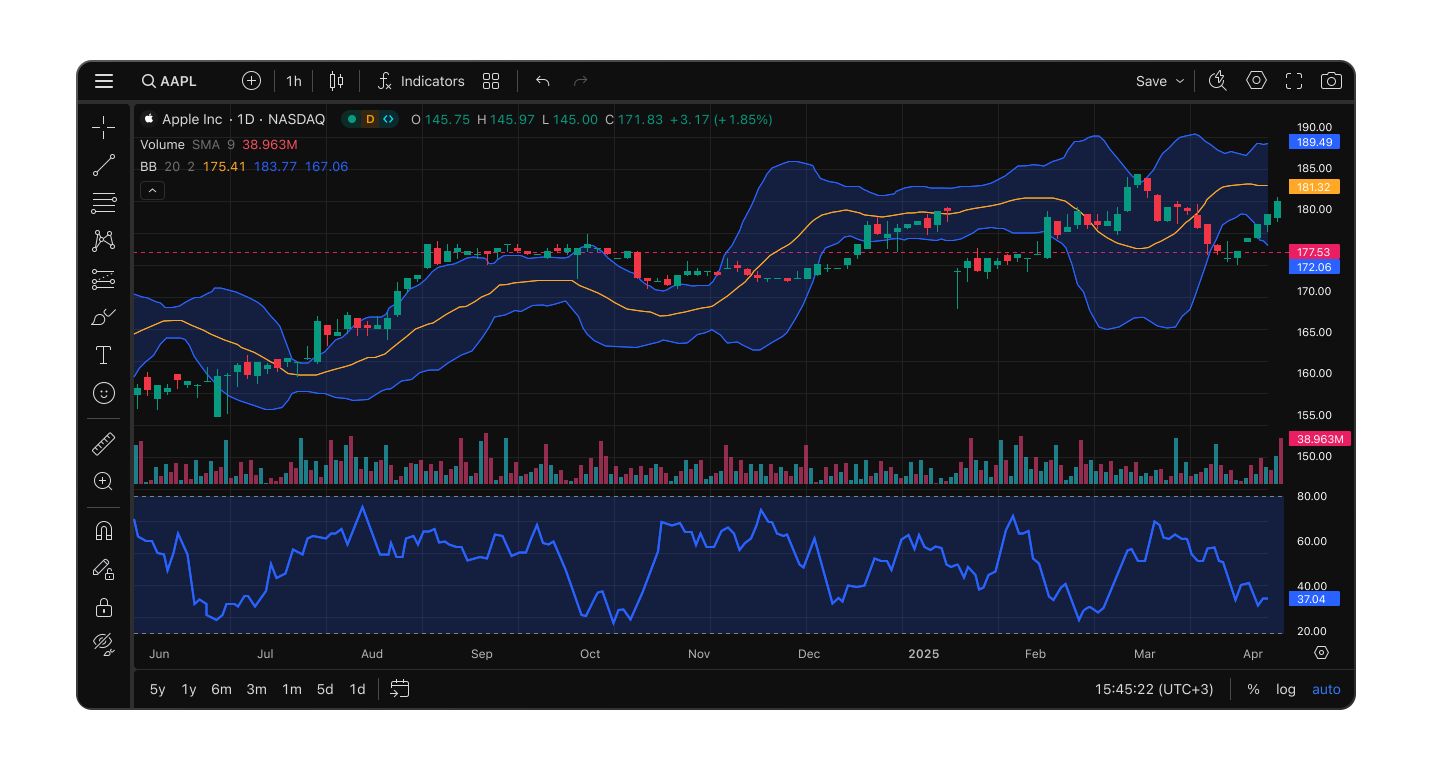
TradingView offers a wide array of functionalities that cater to various trading styles and analytical needs. These robust TradingView Forex features are designed to empower traders with actionable insights.
TradingView Charting Tools
The platform’s advanced TradingView charting tools are central to its appeal. They provide unparalleled flexibility and depth for technical analysis, establishing it as the best charting software Forex market has to offer.
- Multiple Chart Types: From traditional candlestick charts to Renko and Heikin Ashi, traders can choose the chart type that best suits their analysis.
- Customizable Timeframes: Users can select from numerous timeframes, ranging from one second to monthly intervals, allowing for both short-term and long-term analysis.
- Drawing Tools and Indicators: With over 100 built-in indicators and a vast selection of drawing tools, traders can perform detailed technical analysis with ease.
Real-Time Data and Market Coverage for Forex

Access to accurate and timely data is vital in Forex trading. TradingView ensures traders have the most up-to-date information at their fingertips.
- Live Market Data: TradingView provides real-time data for Forex pairs, ensuring traders have the most current information.
- Economic Calendar: The platform includes an economic calendar that highlights upcoming events and announcements, helping traders anticipate market movements.
TradingView Analysis Features and Social Community
One of TradingView’s standout TradingView analysis features is its social community, which fosters collaboration and knowledge sharing.
- Idea Sharing: Traders can publish their analyses and trade ideas, fostering a collaborative environment where users can learn from each other.
- Interactive Discussions: The platform supports comments and discussions on published ideas, enabling constructive feedback and knowledge exchange.
Alerts and Notifications
Staying informed about market conditions is simplified with TradingView’s alert system. These customizable alerts are crucial TradingView Forex features for active traders.
- Customizable Alerts: Set alerts based on price levels, technical indicators, or drawing tools, ensuring you’re notified of significant market movements.
- Multiple Delivery Methods: Receive alerts via SMS, email, or pop-up notifications, allowing you to stay connected regardless of your location.
Pine Script – Custom Scripting Language
For traders seeking to develop custom indicators or strategies, Pine Script is an invaluable tool.
- Pine Script: TradingView’s proprietary scripting language enables users to create and share custom studies and signals, enhancing the platform’s flexibility.
Integrating TradingView with Forex Trading on Phemex
While TradingView offers exceptional analysis tools, executing trades requires a reliable broker. Phemex, a leading trading platform, provides seamless integration with TradingView, offering a comprehensive trading experience. This integration exemplifies the power of using TradingView for Forex execution.
Benefits of Using Phemex for Forex Trading
- Zero Trading Fees: Phemex offers zero-fee trading for premium members, making it a cost-effective choice for active traders.
- Advanced Trading Infrastructure: With high-speed trade execution and minimal latency, Phemex ensures that traders can capitalize on market opportunities without delay.
- Comprehensive Asset Selection: Beyond Forex, Phemex provides access to a wide range of assets, including cryptocurrencies and commodities, allowing traders to diversify their portfolios.
How to Connect TradingView with Phemex
- Create Accounts: Ensure you have active accounts on both TradingView and Phemex.
- Access Trading Panel: On TradingView, navigate to the trading panel at the bottom of the charting interface.
- Select Phemex: From the list of available brokers, choose Phemex and follow the prompts to authorize the connection.
Conclusion
The extensive TradingView Forex features provide traders with a powerful arsenal for market analysis and strategy development. From its advanced charting capabilities to its vibrant social community and custom scripting language, TradingView stands out as a premier platform. When combined with a robust broker like Phemex, traders gain a comprehensive solution for identifying opportunities and executing trades efficiently in the Forex market. These TradingView Forex features truly unlock profitable trading potential.


AlexTrader92
Great breakdown! TradingView has been my go-to for charting, but I didn’t realize I could integrate it with Phemex. Gotta check that out